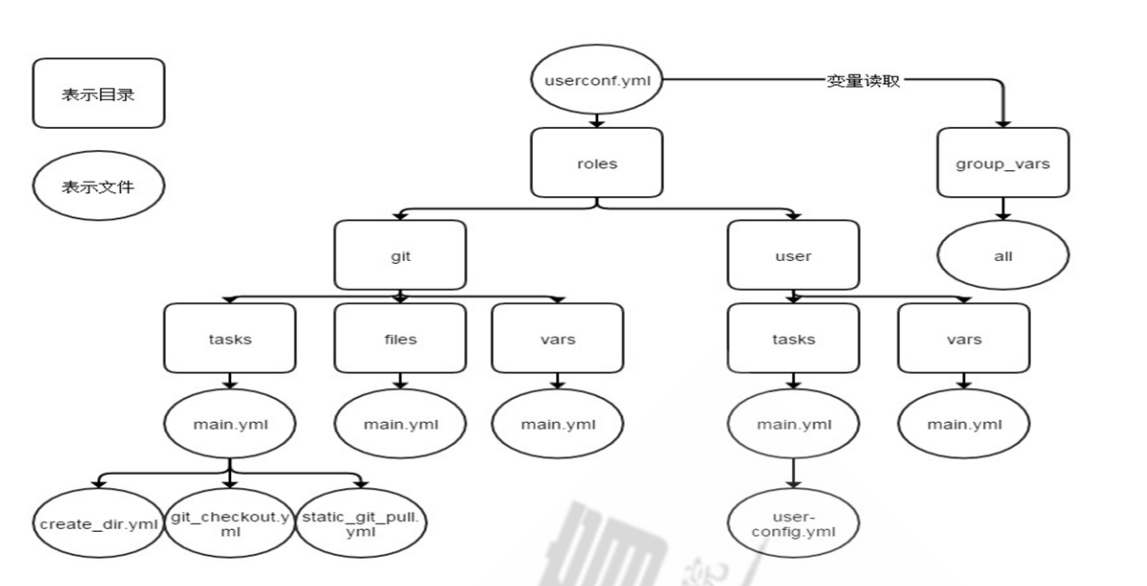
本文参考文章
Ansible Ansible部署
1
2
pip download ansible
默认没有创建 /etc/ansible 需要手动创建
Ansible配置说明
/etc/ansible/ansible.cfg 主配置文件, 配置ansible的工作特性./etc/ansible/ansible.cfg 主机列表清单./etc/ansible/roles/ 存放(roles)角色的目录./usr/local/bin/ansible 二进制执行文件, ansible 主程序./usr/local/bin/ansilbe-doc 配置文档, 模块功能查看工具./usr/local/bin/ansible-galaxy 用于上传/下载 roles 模块到官方平台的工具./usr/local/bin/ansible-playbook 自动化任务、编排剧本工具/usr/bin/ansible-pull 远程执行命令的工具./usr/local/bin/ansible-vault 文件(如: playbook 文件) 加密工具./usr/local/bin/ansible-console 基于 界面的用户交互执行工具.
Ansible执行过程
load配置文件 /etc/ansible/ansible.cfg
Load 模块配置文件
通过 Ansible 将调用的模块或PlayBook生成对应的临时 py文件, 并将该临时文件传输至远程服务器的对的执行用户目录下 $HOME/.ansible/tmp/ansible-tmp-2123/xxxxxxx.py >文件.
对生成的文件添加可执行权限.
执行生成文件,并返回对应的结果.
删除生成文件,退出.执行返回状态:
绿色:执行成功,无更改操作。如 ping模块
黄色:执行成功,更新过主机的操作。如执行shell模块执行ifconfig命令。
红色:执行失败返回结果。如FAILED、UNREACHABLE状态。
Ansible-Doc
1
2
3
4
5
6
7
# 显示可用的模块 # 显示指定模块的playbook阶段
Ansible
ansible <host-pattern> [-m module_name] [-a args]
host-pattern: 主机ip、主机名、主机组。
module_name: 模块的名称。默认为 -m command 。
args: 模块的参数, 需要加上 -a 进行指定模块的参数。如: ansible all -a 'hostname'
-v、-vv、-vvv: 显示详细的命令输出日志, v 越多越详细。如: ansible all -m ping -vvv
–list: 显示主机的列表。如: ansible all --list
-k / –ask-pass: 提示输入ssh连接密码, 默认为 ssh-key 认证。如: ansible all -m ping -k
-K / –ask-become-pass: 提示输入 sudo 的密码。
-C / –check: 检查命令操作, 并不会执行。如: ansible all -m ping -C
-T / –timeout: 执行命令的超时时间, 默认为 10s。如: ansible all -m ping -T=2
-u / –user: 执行远程操作的用户. 如: ansible all -m ping -u=root
-b / –become: 代替旧版的 sudo 切换。
-i 指定主机清单文件 ansible -i /data/ansible/hosts containers -m ping -o
/etc/ansible/ansible.cfg
1
2
3
4
5
6
7
8
9
10
11
12
13
14
15
16
17
18
19
20
21
22
23
24
25
26
27
28
29
30
31
32
33
34
35
36
37
38
39
40
41
42
43
44
45
46
47
48
49
50
51
52
53
# defaults 为默认配置 # 主机清单的路径, 默认为如下 # inventory = /etc/ansible/hosts # 模块存放的路径 # library = /usr/share/my_modules/ # utils 模块存放路径 # module_utils = /usr/share/my_module_utils/ # 远程主机脚本临时存放目录 # remote_tmp = ~/.ansible/tmp # 管理节点脚本临时存放目录 # local_tmp = ~/.ansible/tmp # 插件的配置文件路径 # plugin_filters_cfg = /etc/ansible/plugin_filters.yml # 执行并发数 # forks = 5 # 异步任务查询间隔 单位秒 # poll_interval = 15 # sudo 指定用户# sudo_user = root # 运行 ansible 是否提示输入sudo 密码 # ask_sudo_pass = True # 运行 ansible 是否提示输入密码 同 -k # ask_pass = True # 远程传输模式 # transport = smart # SSH 默认端口 # remote_port = 22 # 模块运行默认语言环境 # module_lang = C # roles 存放路径 # roles_path = /etc/ansible/roles # 不检查 /root/.ssh/known_hosts 文件 建议取消 # host_key_checking = False # ansible 操作日志路径 建议打开 # log_path = /var/log/ansible.log
主机存活探测模块 ping /etc/ansible/hosts主机资产配置
1 2 3 4 5 6 7 8 [containers]# 设置containers的登陆用户及密码
跳过第一次登陆认证(输入yes的那个操作)
1 2 host_key_checking = False
执行
1
2
3
4
5
ansible containers -m ping -o
内置变量模块 setup 使用范例
1
2
3
4
5
6
7
8
9
10
11
12
13
14
15
16
17
18
19
20
21
22
ansible all -m setup -a 'filter=ansible_hostname '
1 2 3 4 5 6 7 8 9 10 11 12 13 14 15 16 17 18 19 20 21 22 23 24 25 26 27 28 29 30 31 32 33 34 35 36 37 38 39 40 ansible_ form_ factor 服务器类型 _ virtualization_ role 虚拟机角色(宿主机或者虚拟机) _ virtualization_ type 虚拟机类型(kvm) _ system_ vendor 供应商(Dell) _ product_ name 产品型号(PowerEdge?R530) _ product_ serial 序列号(sn) _ machine 计算机架构(x86_ 64) _ bios_ version BIOS版本 _ system 操作系统类型(linux) _ os_ family 操作系统家族(RedHat) _ distribution 操作系统发行版(CentOS) _ distribution_ major_ version 操作系统发行版主版本号(7) _ distribution_ release 操作系统发行版代号(core) _ distribution_ version 操作系统发行版本号(7.3.1611) _ architecture 体系(x86_ 64) _ kernel 操作系统内核版本号 _ userspace_ architecture 用户模式体系(x86_ 64) _ userspace_ bits 用户模式位数 _ pkg_ mgr 软件包管理器 _ selinux.status selinux状态 _ processor CPU产品名称 _ processor_ count CPU数量 _ processor_ cores 单颗CPU核心数量 _ processor_ threads_ per_ core 每个核心线程数量 _ processor_ vcpus CPU核心总数 _ memtotal_ mb 内存空间 _ swaptotal_ mb 交换空间 _ fqdn 主机的域名 _ default_ ipv4.interface 默认网卡 _ default_ ipv4.address 默认IP地址 _ default_ ipv4.gateway 默认网关 _ devices 硬盘设备名 _ devices.vendor 硬盘供应商 _ devices.model 硬盘整列卡型号 _ devices.host 硬盘整列卡控制器 _ devices.size 设备存储空间 _ interfaces 网卡 _ {interfaces}.ipv4.address 网卡IP地址 _ {interfaces}.ipv6.0.address 网卡IPv6地址 _ {interfaces}.macaddress 网卡mac地址
Ansible Palybook 变量引用 vars 定义变量文件
1
2
3
--- package_name: nginx env_name: prod
palybook
1
2
3
4
5
6
7
8
9
10
11
12
13
14
15
16
17
18
19
20
21
22
23
- hosts: 123.57 .71 .226 remote_user: root vars_files: - vars.yaml tasks: - name: "{{ env_name }} install {{ package_name }} " shell: echo {{ package_name }}register: print_package_name - name: "输出{{ print_package_name }} 信息" debug: var=print_package_name.stdout - name: "{{ inventory_hostname }} " shell: echo {{ inventory_hostname }}register: print_inventory_hostname - name: "输出{{ inventory_hostname }} 信息" debug: var=print_inventory_hostname.stdout
服务安装 yum 1 2 3 4 ansible-playbook yum.yaml -C --limit 172.17.0.4,172.17.0.5
-C 检查脚本运行情况,不在服务器执行
–limit 指定节点机器运行 –limit 172.17.0.4,172.17.0.5
1 2 3 4 5 6 7 8 9 10 11 - hosts: containers remote_user: root vars: - pak_name: httpd - env_name: prod tasks: - name: "{{ env_name}} install {{ pak_name }} " yum: name: '{{ pak_name }} '
二进制服务安装Nginx(例子) 目录结构
1 2 3 4 tree . ├── index.html.j2 └── install_nginx.yaml
index.html.j2 文件内容
inventory_hostname 获取主机ipv4地址
1 2 <h1> {{ inventory_hostname }} </h1>
安装Nginx剧本
可以通过 -t tag 来进行配置文件检测、拷贝首页、 并触发重启动作。
ansible-playbook -t html,check install_nginx.yaml
1 2 3 4 5 6 7 8 9 10 11 12 13 14 15 16 17 18 19 20 21 22 23 24 25 26 27 28 29 30 31 32 33 34 35 36 37 38 39 40 41 42 43 44 45 46 47 48 49 50 51 52 53 54 55 56 57 58 59 60 61 62 63 64 65 66 67 68 69 70 71 72 73 74 75 76 77 78 79 80 81 82 83 84 - hosts: containers remote_user: root gather_facts: False vars: - nginx_user: nginx - nginx_group: nginx - nginx_version: 1.18 .0 - nginx_tmp_dir: /opt - nginx_listen_port: 80 - nginx_prefix_dir: /usr/local/nginx tasks: - name: "install nginx rely packages" yum: name: - net-tools - pcre - pcre-devel - openssl - openssl-devel - zlib-devel - gcc - wget - name: "Add nginx group" group: name={{ nginx_user }} system=yes - name: "Add nginx user" user: name={{ nginx_user }} shell=/sbin/nologin system=yes group={{ nginx_group }} - name: "Download nginx package" get_url: url: http://nginx.org/download/nginx-{{ nginx_version }}.tar.gz dest: "{{ nginx_tmp_dir }} /nginx-{{ nginx_version }} .tar.gz" - name: "nginx exists" stat: path: "{{ nginx_prefix_dir }} /sbin/nginx" register: file_status - name: "install nginx" shell: "cd {{ nginx_tmp_dir }} ;tar -xf nginx-{{ nginx_version }} .tar.gz;cd nginx-{{ nginx_version }} ;./configure --user={{ nginx_user }} --group={{ nginx_group }} --prefix={{ nginx_prefix_dir }} --with-http_stub_status_module --with-http_ssl_module --with-pcre --with-http_realip_module;make&& make install" when: file_status.stat.exists == False - name: "check nginx status" shell: netstat -anpt |grep {{ nginx_listen_port }} |grep LISTEN |wc -l register: port_result - name: check config shell: "{{ nginx_prefix_dir }} /sbin/nginx -t " register: status_result tags: check - name: startd nginx shell: "{{ nginx_prefix_dir }} /sbin/nginx" when: port_result.stdout == "0" - name: "Copy html file" template: src=index.html.j2 dest={{ nginx_prefix_dir }}/html/index.html notify: reload nginx tags: html handlers: - name: reload nginx shell: "{{ nginx_prefix_dir }} /sbin/nginx -s reload" when: status_result.rc == 0
Roles 角色 roles角色结构如下
roles目录结构
1 2 3 4 5 6 7 8 9 10 playbook.yml
files/ :存放由copy或script模块等调用的文件
templates/:template模块查找所需要模板文件的目录
tasks/:定义task,role的基本元素,至少应该包含一个名为main.yml的文件;其它的文件需要在此文件中通过include进行包含
handlers/:至少应该包含一个名为main.yml的文件;其它的文件需要在此文件中通过include进行包含
vars/:定义变量,至少应该包含一个名为main.yml的文件;其它的文件需要在此文件中通过include进行包含
meta/:定义当前角色的特殊设定及其依赖关系,至少应该包含一个名为main.yml的文件,其它文件需在此文件中通过include进行包含
default/:设定默认变量时使用此目录中的main.yml文件,比vars的优先级低
二进制服务安装Docker(例子) 目录结构
1 2 3 4 5 6 7 8 9 10 11 12 13 14 15 ├── install_docker.yaml
playbook调用角色
1 2 3 4 5 cat install_docker.yaml
file目录
1 2 3 4 5 6 7 8 9 10 11 12 13 14 15 16 17 18 19 20 21 22 23 24 25 26 27 28 29 30 31 32 33 34 35 36 37 more roles/docker/file/*
tasks目录
1 2 3 4 5 6 7 8 9 10 11 12 13 14 15 16 17 18 19 20 21 22 23 24 25 26 27 28 29 30 31 32 33 34 35 36 37 38 39 40 41 42 43 44 45 46 47 48 49 50 51 52 53 54 55 56 57 58 59 more roles/docker/tasks/* :::::::::::::: roles/docker/tasks/main.yaml :::::::::::::: - include: download.yaml - include: copybin.yaml - include: createdir.yaml - include: copyconfig.yaml - include: service.yaml :::::::::::::: roles/docker/tasks/copybin.yaml :::::::::::::: - name: copy bin file copy: src="{{ docker_tmp_dir }}/docker/{{ item }}" dest="/usr/bin/{{ item }}" remote_src=yes mode=0755 with_items: - containerd - containerd-shim - ctr - docker - dockerd - docker-init - docker-proxy - runc :::::::::::::: roles/docker/tasks/copyconfig.yaml :::::::::::::: - name: copy system file copy: src="file/docker.service" dest="/usr/lib/systemd/system/docker.service" - name: copy config file copy: src="file/daemon.json" dest="/etc/docker/daemon.json" :::::::::::::: roles/docker/tasks/createdir.yaml :::::::::::::: - name: create directory file: path="{{item}}" state=directory with_items: - /home/docker - /etc/docker - /etc/systemd/system/docker.service.d/ :::::::::::::: roles/docker/tasks/download.yaml :::::::::::::: - name: "Download docker package" get_url: url: https://download.docker.com/linux/static/stable/x86_64/docker-{{ docker_version}}.tgz dest: "{{ docker_tmp_dir }} /docker-{{docker_version}} .tgz" - name: open tgz shell: "cd {{ docker_tmp_dir }} ; tar xf docker-{{docker_version}} .tgz " :::::::::::::: roles/docker/tasks/service.yaml :::::::::::::: - name: start docker service shell: systemctl daemon-reload && systemctl restart docker - name: enable docker service shell: systemctl enable docker
vars目录
1
2
3
more roles/docker/vars/* docker_version: "19.03.9" docker_tmp_dir: "/opt"